Managing and making the most of your software

Let’s face it, our businesses probably wouldn’t function without a computer or two, yet we do things every day that leave us vulnerable should things go wrong. So let’s assume your software is broken, or you can’t do something and you need help — well here’s how to make the most of your software and solve those problems.

Finding the right software resources

First up, I’m not going to explain how to use this or that piece of software. What I am going to do is explain how to ask the right question to the right people in the right places.

Bookmarks and Favourites

So you’ve bought some new software. Good for you! Now go to the website of the company you just bought it from and bookmark their:

  • home page for your country;
  • their blog, perhaps subscribing to their feed;
  • their support section, and;
  • their support forums.

I’m using Apple’s Safari as my main web browser to manage all of my bookmarks, which I’ve organized into folders. I use Safari because I can synchronize all of my important data with my iPhone, so I’m always connected.

Important data — that’d be like passwords, right? Here’s my 7 security tips for your computer and the web.

So instead of groping around, wondering what the hell to do, you have instant access to the web resources you’re going to need to solve those problems.

All good software vendors will be as connected as possible, not just hiding behind a premium rate telephone number, or some Byzantine and labyrinth-like support structure, to wear you out before you’ve found the help you need. And those vendors that are really connected will be socially networked…

Twitter and Facebook

While hooking up with your software vendors via a social network might not smack of support, it is in so far as paying attention to their messages, which are often hints, tips and notifications of security patches and upgrades. Also, with Twitter, you get to message them directly and stand a good chance of getting a reply to your question.

If they have a Page on Facebook, then you’ll see much the same as you will on Twitter, but more in depth, with comments from other users and what their thoughts are.

Sometimes, you might get more help from the user comments than from the vendor themselves; especially if you’re considering an upgrade but it turns out to be problematic for some.

Why not read my beginner’s guide to social networking?

When software goes wrong

First of all, don’t panic! Write down your problem, try to re-create that problem and then make some notes. Sometimes, major problems can result in a loss of data, so get into the habit of saving; make that thumb and forefinger save shortcut an instinctive reflex!

Urgent problems

Once you’ve got your notes, write them out as a series of 1, 2, 3 style steps, explaining what you did, right up to (and perhaps beyond) the problem you encountered.

Next, go to the support section for the vendor of the software and look for a support contact form, where you get to add your details and your notes. This is urgent, so follow up with a call.

Why bother with the support contact form if this is urgent? Because this will be the basis of your support query, which they will then work from. Also, this offers you some redress, should they have problems dealing with your support query.

The next steps are crucial, because we can’t assume you’re dealing with the right people first off. Most support calls will lead you to the front line of support, often called level one, which are people who’re often reading from scripts and might not be technically familiar with the software. If you know you have a genuine problem and it is urgent, ask to speak to someone senior to them.

Next, make more notes! Seriously, take names, mark down the time and make complete notes of what they’re telling you. Because if things go wrong here, you’re going to need those notes.

I can’t tell you how many times I’ve experienced problems with support personnel and used my notes because they simply haven’t even bothered following their own support tickets, or even making any support tickets in the first place.

Dazed and confused?

Well, you may be as well posting your problem into their support forums, for other users to help you with. In most cases, you’ll need to create an account before you can post (unless you’ve not already done so as part of the registration / sign-up process), but it’ll be worth the effort, believe me.

Some of the people you’ll meet on their are as or more knowledgeable about the software than the people who wrote it. Also, the people who maintain the forums — the moderators — will often assist, too. These people are the ones you’re really going to benefit from most.

But, before you post anything, use their search engine first, to see if anyone else as had the same problem as you. Sometimes, you’ll find a whole stream of similar problems, with solutions already provided.

Sometimes, their search tool isn’t the best, so what do you do? Why, use Google, of course! Google is often much better at finding things on forums than the forums themselves.

Software Q&A

So your problem is small, mildly annoying, but otherwise not a show stopper. Try messaging them on Twitter to get an answer. Or, you can just Tweet a message with their @name in it, to get their attention.

Some people confuse being rude with asking for support, by posting borderline abusive messages with their @name in them, for effect more than anything else. I suppose it goes without saying that you shouldn’t do this!

And finally…

Aside from the vendors themselves, there are plenty of unofficial resources out there, many of which are well maintained and very, very popular. Mostly run by fans, these places can be abuzz with tips, tricks and solutions. So be on the look out!

If you can’t explain what happened, don’t expect much more than a fake frown and a shrug of the shoulders from the support people. So there are no software tricks and keyboard shortcuts when it comes to getting the help you need — you have to be calm, methodical and have the right resources just a few clicks away.


Don’t be afraid to ask questions

Why. Now there’s a thing to ask. I often can’t ask enough questions. If I didn’t ask questions, projects simply wouldn’t get off the ground.

OK, first of all, sorry about the long absence; I’ve been very, very busy over the last several months. Right now, I’m working on several large projects (more about those some other time, perhaps) that are soaking up a good measure of my time. However, I was aware of the time between now and the last article, so here I am, with some thoughts of mine from the front line.

A question of taking the lead

Over the last week or so, I’ve been working on a lead that came through the Octane website from a freight company in London. They want a system to manage consignments and customer payments that their staff can use both here and abroad, where their customers’ consignments are being shipped to. After having sent something like 25 emails to them, we were finally edging closer to something resembling what they wanted, as a brief, and here’s what they had to say:

“Thanks for your input. Really appreciated. I must say you are the second person that we would consider if we do go ahead with the system development. I really like the way you broken down things and you are also detailed and have so many question which I think is the only way to understand what we really want. Others have come up with estimates without asking a fraction of the questions which you have asked.”

You see, I can’t do my job properly (or perhaps at all) if I don’t know enough about the things I’m working on. Also, there are times when what the client thinks they want isn’t really what they need, or more importantly, what their customers need. And then there’s the unintentional omissions, the lack of technical clout on their part, the legal implications, and finally, the gotchas.

Being like Colombo

Not everyone appreciates the endless barrage of questions. I suppose some people find being asked questions like some kind of pestering, or that you’re questioning their abilities in some way, as if they haven’t or can’t articulate their needs properly.

Let’s face it, who doesn’t think Lieutenant Colombo a laughable irritation with his trademark “Err, excuse me, sir. Just one last question…” he asks, head bowed, with an upturned hand to his head, waving his cigar aloft as he scratches a furrow in his brow with a stubby thumb. But you know what? Colombo always figured things out in the end.

He would often ask obvious questions. Now, they are the most irritating questions, but sometimes, you need to make absolutely sure you understand things, or woe betide the fool who goes to work on X when the project required Y.

One lead in particular kept insisting that what she wanted was simple because she’d seen a friend doing the same thing, whatever that meant. Once I’d managed to disentangle what she needed from what she thought she wanted, the whole complexion of the project changed dramatically. Rather than something simple, what was asking for would have been a £3,000-5,000 project, while not earth shattering, is still much more than she’d anticipated. I replied with an email containing a huge list of questions I’d managed to lift from difference sources, to save time, and I never heard from her again!

Fire away!

I freely admit that I’m not the diplomat I imagine myself to be, and so a machine gun style assault of questions might not have been the best tactic, in that one instance.

The problem for yourself is knowing how far to go, and how much effort to pour into that earliest of phases, when they could just take your questions, your initial thoughts and vanish into the night. I’m in a similar position, whereby the aforementioned lead could easily take the draft brief and schedule for the web application project I’ve supplied them with a move onto someone else.

I’m able to mitigate against some of these problems by giving them only the most superficial explanation of what I have in, leaving out key details which would allow them to take my ideas make them happen. So for them to get at my ideas, they need me to follow them through. However, if you’re just selling red, green and blue widgets, you have to find other ways of keeping that lead warm.

So, what am I asking you to do? Why ask questions, of course! Honestly, don’t be afraid to look silly asking those obvious questions, because that one moment of silliness might look like a good deal more appealing than seeing a project stall or even fail, all for the want of being obvious.


Why the hell should small businesses even care about brand?

Brand is something most people have an understanding of — Heinz, Apple, Ford, Nike, Sony. Just about everyone knows the value of a brand name and the perception of others towards you when you invest in those brands. But what about your own brand, and does it even make sense to talk about your own business brand when you’re a small business?

The rules that apply to the Ford’s and Apple’s of this world also apply to your local plumber, joiner and electrician. Recently, I wrote about the 10 personal branding habits of the professionals, which has been a very successful article, one that clearly resonates with a lot of businesses around the world. However, it’s not the rules that separate the large businesses from the smaller ones, but the words, phrases and terminology; big businesses are much more likely to have university educated marketeers who’re up on all the current business parlance. As for the small business? It’s all buzz words and jargon to them.

The cult of personality marketing

Over on Marketing Donut, a growing business services and advice web magazine, a title caught my eye — “I’m a small business – why do I need a brand?” It’s a good question. It’s also a very good article, too!

For the most part, talking about brand with small businesses is just confusing and stirs up more questions than it answers. However, the advice offered here in the above article is precisely the kind I offer to my clients, which makes the whole thing much more understandable to the plumbers, joiners and electricians of this world.

Oftentimes, the client will reply by saying: “Oh, so this is like a brand name, yeah?” So I find it’s better to let them make that connection, rather than me try and place it there. At that point, brand isn’t this big thing, but something they can not only get a fix on and pursue as a function of their own marketing, succeeding by the sheer weight of their own personality.

It’s easy to think of marketing, or any kind of promotional activity, as being external to you and your business, as if there’s no physical connection between the two. But that’s what brand is essentially all about; bridging the perception of your business with the business itself. In reality, you become the very essence of your marketing.

But even this sounds contrived and lofty, when for the most part a smile, a disarming joke, a professional approach to work and a little honesty are all hallmarks of someone who’s likely to do well from word-of-mouth marketing. And at that point, their brand begins to grow and grow.

Out there, all over the country, thousands of plumbers, car mechanics, joiners, painters, decorators and electricians have thriving local trades, all of which are directly attributable to them marketing themselves through their personalities.

The brand performance curve

I’ve found is that smaller businesses often feel a greater benefit from an improved brand image than larger more established businesses, with the plumber being a good example; you really wouldn’t expect your local plumber to have professionally designed and printed business cards, would you?

So that one thing makes a statement which implies someone who is established and professional enough to put their name to their service. Immediately, the perception of that business is lifted high above their competitors. But for the larger more established businesses, the effort required for differentiation is measurably more difficult. Why? Because it is expected that larger businesses have business cards, compliment slips, headed paper and envelopes, pretty girls answering telephone calls in plush office receptions, account handlers wearing crisp suits and wide smiles —here, differentiation demands extraordinary people making extraordinary effort because these businesses have ridden their brand performance up and over the curve and are now coasting along the plateau.

Do you still care about your brand?

You should. But I wouldn’t get too hung up about it, either. Many business people recognize their deficiencies, so if you can see where you’re going wrong, you’re already on the road to a remedy. That said, knowing that little changes can lead to better things for your small business, perhaps you ought to think big!


What is Google Local and how can it help your business?

So what is it be local? And local to who? Depends where you are. With more people on the move than at probably any other time, Google Local just made being a local business better than ever.

Google Local really does put your business on the map, in a very real sense. Be you a sole trader auto mechanic, or a family-owned chain store with city-wide shops and stores, Google Local can help get your business found. Here’s how to make the most of Google Local.

What is Google Local?

Most people know of Google Maps, especially their excellent app’ for the iPhone. Google Local takes Maps and makes a place for business, offering people like you and me the chance to add details about our businesses, like opening times, the payment methods we accept, as well as the services we offer.

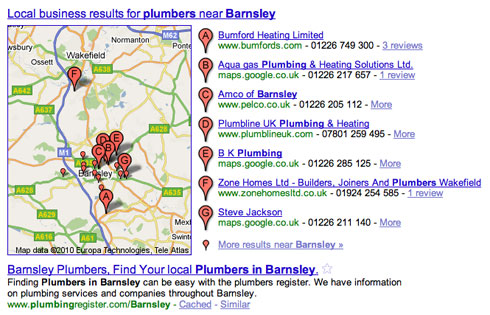
Say you’re looking for a plumber. Google knows roughly where you are and will find all of the plumbers close to where you are. If they have a listing on Google Local, you’ll have the option to view more details about them.

Put simply, Google Local highlights your business for everyone to see when they’re searching in your area.

How can Google Local help your business?

Google Local has come a long way in the past year. Now more tightly integrated with Maps than ever before, there’s plenty of reasons to get your business on the map.

Coupons — special offers, deals and discounts

You can now add coupons to your listing, which people can print, cut out and bring to your shop, store or restaurant to qualify for the offer the coupon relates to. This is ideal if you’re looking to clear stock, or to just drum up some extra trade.

Reviews — what customers think about your business

As the web becomes an ever more social place to be, customer reviews are playing a major role in the trust people place in the businesses they use. If someone writes a damning review of your business, that might not be the end of the world if it’s just one against ten others that are filled with glowing praise.

People rely heavily on the say-so of others, for things like consumer goods and especially food. And because things are much more open and publicly available than ever before, the emphasis has to be on quality.

So if you have happy customers or clients who you feel are willing to say something nice about your business, get them to write a review on your Google Local listing.

Photos — if you’ve got it, flaunt it!

Do you own a plush bar and restaurant, or maybe your offices are a uniquely styled building? Then there’s a good chance you have some professional photography. They say a picture paints a thousand words. Google Local lets you add up to 10 photos, which will enhance your listing no end.

Google Local now also integrates with Street View. So if Google have been down your street, taking panoramic photos of your place of business, that’s something else for your potential customers and clients to consider.

Statistics — see how someone found you

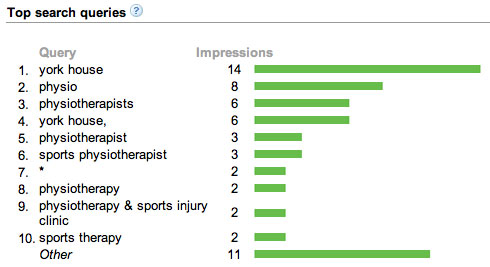
Having a Google Local listing is one thing, but if you can see what words people are typing into Google, that brought them to your listing, that’s valuable marketing information. Google Local offers exactly this facility. In addition, you’ll see how many people searched using which words and when, and when they clicked onto your website.

Posts — mention up-coming events and special offers

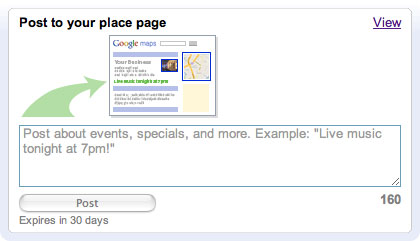
Having coupons for special offers is one thing, but promoting them is something else. Google Local lets you post a quick message (limited to 160 characters) about your offer or event, which appears in your listing.

The mobile web makes every business local

Imagine you’re out in a town or city you’re unfamiliar with. You’re with a bunch of friends and you’ve all agreed on Italian food. But where? If you’ve got an iPhone, Google will take “Italian restaurant” and find the ones closest to you. It’s that simple.

Having a complete listing on Google Local, filled with positive reviews and gorgeous photography, may be the difference between a party of 3-5 people spending money with you (plus tips), or spending their evening and their money with your competitors instead. Worst of all, you probably won’t even know why.

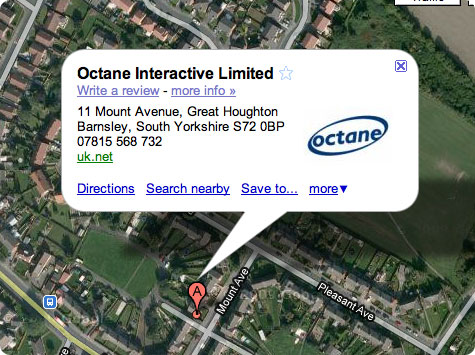
If you’d like to know more about Google Local, or would like to add a listing for your business, why not give me a call on 07815 568 732, or contact Wayne right away?


Is it possible to run a paperless business?

Ten years ago, going paperless would have been desirable but almost impossible. Now, the idea of running a paperless office is just about doable. I should know, I’ve been trying for long enough. Here’s my experiences and some handy tips to help you make your business paperless, too.

I hate filling out forms. I may have an allergy to paperwork. So much so, I often go to extraordinary lengths to avoid paperwork myself.

I rarely work hard. I work smart instead. You may find me toiling over something for a while, only to discover that over time, I’ve made a saving in some way. So I’m always on the look-out for novel ways of doing boring things faster and more efficiently. Going paperless falls slap bang into this area, but it’s not been easy.

Why go paperless?

But that’s not the only reason I wish to go paperless; email is much quicker and simpler alternative to sending a letter. And then there’s the green argument, which is entirely justified, too. Even though I’ve been working towards going paperless for years, the reality is much different to the imagined.

While I very rarely send a letter to anyone these days, I still get lots of written correspondence, especially from government agencies, like Her Majesty’s Revenue & Customs, as well as Customs & Excise. Then there’s the junk mail, which is annoying to say the least.

3 reasons to go paperless in the office

To a greater and lesser extent, I have to make concessions, sacrifices and some extra effort to keep the paperwork to a minimum. And here’s three reasons why you should try running a paperless office:

  1. In your own small way, you’ll be helping the environment. So if you’re a big company and you manage to make the transition to electronic communications and document management, you’ll be making an even greater impact.
  2. Save valuable storage space. I have clients who dedicate entire rooms to filing cabinets and storage boxes. Imagine being able to recover all that space and use it for something more worthwhile.
  3. Going paperless also means going electronic, which means things should be much easier to store and find. I emphasize the word “should” because unless you have a good idea of how you want to store your company data, you’re just as likely to lose a file on your computer as you are a letter on your desk! So unless you have the right processes in place, you won’t feel the full force of the savings a paperless office can offer.

What kind of things can you do electronically?

There’s no point going paperless if you’re not aware of the very things where going paperless will have the greatest impact on your business. So here’s a few places where going electronic will pay dividends over time.

So here’s some ideas, with suggestions for alternative ways of doing things, depending on what the idea is and what it involves.

Internet banking

My internet banking offers a wealth of options for managing my business finances. I can view my account, see next day payments, settle invoices, transfer money between my various accounts, as well as view all of my previous bank statements and much more besides.

I’m in the process of adding my accountants to my internet banking account so they can handle all of my finances, keeping my involvement to a minimum. There are also other savings to be had here, such as less time spent traveling to and from their offices, as well is the calls between the two of us as we try to track down that one lost bank statement.

Submitting your VAT and filing your company accounts

You can now file your VAT on-line. I’ve now authorized my accountants so now I don’t even have to sign anything. And once they get access to my internet banking, I doubt I’ll have any involvement at all.

It’s been possible to file company accounts to Companies House for some years. Slowly but surely, the various government agencies are getting their act together and moving onto the internet.

Manage your projects and time sheets

I wrote my own software some time ago to help me manage my projects and to keep track of my work time. But in the end, I ran out of time to add the kind of features that I needed. In the end, it was cheaper to buy a 3rd party application than spend my time updating my own.

So I bought Daylite and Billings. I’m a Mac, not a PC. So unless you own a Mac, Daylite and Billings are no good for you. However, there are tons of alternatives out there.

Daylite is CRM (Customer Relationship Management) package with some solid project management tools thrown in. I use Daylite to manage all of my client projects, emails and events, and more. Billings in a time tracking and invoicing tool.

They’re both from the same company, which means they work quite closely together, so I can shunt tasks or entire projects into Billings from Daylite.

Here are alternatives to Daylite and Billings for PCs, and here’s some earlier thoughts of mine on project management.

Make notes of meetings and telephone conversations

When I make calls, I often make notes of what was discussed, especially if it’s a lengthy call to (or from) a client. Daylite is great here because it has a calendar built right in. So all I do is double-click on the approximate time in the day cell of the calendar and up pops an event window. All I need to do is add in what was said, by whom, when and for how long for. I bypass paper all together.

Send and receive emails with PDFs, not letters or faxes

So once I’ve completed a project and the client is happy, I send an email containing a copy of the invoice as a PDF file. Billings gives me the option to print the invoice, or save it as a PDF. As a backup, I save all of the PDFs to a special folder, so I have copies available.

This is applicable to anything, really. If you use a Mac, you can “print” any document as a PDF from the print window, which is a huge bonus. Again, make sure you have a good storage policy in place so you know precisely where your documents are.

You can even send and receive electronic faxes. I’ve been using You’re Always Connected for years. You get a number to use for either voicemail or faxes. Now, all of my faxes come through as emails with the fax attached as a PDF. So if the fax is from a client, I just move it to the client folder in my mail client. Simple.

Buy ebooks rather than a printed books

Thinking of buying a book to learn something new? Many publishers are now offering electronic alternatives which you can buy on-line and download right there. In many cases, not only are they cheaper, they often include bonus tools and other extras. If you really, really must, you can make a hard copy — and if you really, really, really must print a copy:

  1. make the type size as small as possible, without it being unreadable;
  2. make the margins as wide as possible, without loosing anything;
  3. if your printer supports it, do a duplex and print both sides, and if not, do it by hand.

Use your iPhone as an ad hoc route planner / alternative to maps

Going to a meeting for the first time? Planning on using Google Maps to plot your route and then print it out? If you have an iPhone, use the Maps app’ and then use it just like a GPS for your car.

You get all of the benefits of Google Maps, such as a turn-by-turn route planning, and it even shows you when you’re in motion, moving along the road.

A better workflow

Sadly, there isn’t one application that will scoop everything up and make all of your paperwork suddenly vanish. You need to commit to a slightly different way of doing things. I’m not going to fool you into thinking this is simple because it isn’t. You need to sit down and workout your workflow and make it more efficient. If you have a team, then it’s a team effort.

As an example, I wrote a web application for a client, which took their system of pen, paper and Excel and transformed it into an app’ called To Book which automates and manages almost all of the hotel room booking process, from initial request to confirmation of reservation. Here’s some ideas for making your company workflow paperless:

  • There’s no getting away from the fact that at some point, you’ll still be using paper. So when you do (be it a print out, or a doodle), use the clean side for making quick notes, and then when you’re done, recycle it.
  • Having the right software is paramount, especially when it comes to notation. You need to be able to launch that app’ fast and make notes quickly, especially when someone calls you on the phone. So make shortcuts to those applications and ensure you can export your notes into something else, like your CRM software.
  • When it comes to software designed to deal with customer data, for example, try to standardize across the business, so everyone is using the same tools for things like notation, calendars, office productivity etc. This way, it’s much easier to synchronize and share your data.

Here’s an article of mine (as a PDF, funnily enough) discussing ways of making your workflow more efficient.

Use web-based office productivity software

Here I’m thinking of Google Docs, but now Microsoft are getting in on the act with Microsoft Docs. You can create and share spreadsheets, presentations and text documents with clients and colleagues wherever and whenever. Also, you can sort and store your documents in colour-coded, named folders, which will help make managing you digital assets that bit easier.

And then there’s Google Wave, too. Wave is a word processor with some added smarts. Several people can type into the same document at the same time, which has some truly amazing side benefits, especially for brainstorming. Also, there’s a visual revision history tool, so you can skip backwards and forwards through the different changes that everyone has made, should you (or anyone else) make a mistake or wish to go off in a different direction.

Here’s some ideas of mine on how to make the most of Google Wave.

Use document management software

Chances are, you’ve got thousands of documents that you can’t just send of to be recycled. Besides, you may still need them. So what do you do? You need a document management system. Essentially, a document management system contains the scanned versions of all your printed materials.

This does depend on the kind of document management software you’d be using, but the process typically involves some kind of OCR, which stands for Optical Character Recognition. Which means? Once scanned, you can search your documents as if they were word processed files. In fact, that’s exactly what they become.

So that room filled with shoulder-high filing cabinets can be squeezed into a modestly sized external hard drive, with room left to spare.

Thoughts from the community

Fujitsu Scansnap scanner, industrial shredder, eFax, Instapaper on iPhone. Paperless office sorted.” — Sally Church of Icarus Consultants.

“I find using Evernote removes the hassle of paper notes. Plus, it also allows you to keep notes sync’d across devices.” — Simon Barker, owner of Zath, the tech & games blog.

“A good place to start going paperless is invoicing — much easier and cheaper to produce and send out PDFs instead of printed forms.” — Brian Heys, freelance software tester.

“Scan your signature, paste it into your documents and email back contracts. Sign up for electronic billing wherever possible. Tick the ‘don’t pass on my details to third parties’ box at all times. Always choose email / text / phone as preferred contact method and not postal mail. Sign up for something like EchoSign so that you can get e-signatures. think before you print, usually you just don’t need to. Cancel newspaper subscriptions, and read news on-line, or get a subscription to Factiva / Lexis Nexis for comprehensive electronic access to the news.” — Emily Cagle, communications consultant.

“Forget business cards connect using LinkedIn (simply typing in a public URL).” — Joe Edwards, designer and marketer for Hurricane Marketing.

“Make a list of all the crap publications you get and wipe them out [unsubscribe], all of them!” — Jon-Marc Creaney, architect and designer.

Conclusion

Hopefully, we’ve managed to fill your head with no end of new ideas. But if you’re already running a paperless office, we want to hear your ideas!