Ebook: How to use WordPress to manage your company website

How to use WordPress to manage your company website is my latest ebook, written specifically to help businesses understand the potential of WordPress, as a tool to manage and control their website.

How my ebook will help you get the most from WordPress

“I’ll be taking you through WordPress from a business perspective: what it does, its strengths and weaknesses, how to use it, how to get the most out of it, and how it can genuinely benefit your business. I’ll also be including a guided tour of WordPress, for the total beginners amongst you.”


Here’s just some of the many benefits of understanding how to use WordPress to manage your company website:

  1. Take more control of your website, helping your business save money
  2. Write and publish articles about your products and services in your own time
  3. Share your content on social networks, like Twitter and Facebook
  4. Interact and engage more directly with your customers

My ebook will help you understand and do all those things and more, and includes:

  • An illustrated guide to using WordPress, including how-to videos
  • Examples and links to many of the valuable resources you’ll come to rely on when using WordPress
  • Learn how to optimize your business website or blog for social media
  • WordPress security and privacy (managing email addresses, comment spam and software updates)
  • Video tutorials, to help you with the basics

A business case for WordPress

Like any modern business, having a website is only part of the puzzle. Now, with the web maturing and becoming a deeply social arena, positioning your business as a brand at the heart of a conversation about a product or a service is probably as important than the product / service itself.

So why WordPress?

WordPress is probably the most popular content management system there is, either free or commercial. Thousands of people all around the world write Plugins for it, to extend WordPress and add additional features.

Getting the most from WordPress

It’s also very easy to change the appearance of WordPress, to suite your businesses corporate style. Also, because WordPress makes use of very popular technologies, installing WordPress is, as they say, just five minutes of your time.

If you know of any friends or family members who’re in business and interested in learning more about WordPress, please feel free to tell them about my ebook and send them the link!

All things Octane — This ebook is professionally composed, prepared using Adobe InDesign (a high-end pre-press publishing application), complete with linked indices, graphics and linked references to various other articles of my own, including a collection of short video tutorials on YouTube — yes, I wrote, designed, composed and rendered everything you see in this ebook, including the videos.


Asking clients the right questions

Rarely do you just manage a project in isolation. To some extent, you’re also managing the client. As an added consequence, you’re also managing their expectations. So are their any questions you ought to be asking your client before, during and after a project?

A while ago, I read 14 questions to ask your clients before and after a project, which I encourage you to read if you’re either a freelancer or aspiring project manager, or someone like me, a Jack of all trades. I decided to follow the article up with some insights of my own, gleaned from managing clients, their projects and their expectations.

But first of all, I’d like to add some questions of my own.

What do you need your website to do?

A stupid question? You’d be surprised. In the past, I’ve talked people out of having a website and told them to concentrate on the marketing methods that are proven to work, rather than experimenting with one that most likely won’t earn them a penny or raise their profile.

People still believe that “If we build, they will come” and that is not often the case. Sure, if you’re a hugely popular brand name, or you intend executing a marketing campaign to promote your website, I can help! But if it’s just a brochureware website, made up of few web pages and bunch of images — all of which you’re unlikely to update on a regular basis — there are better ways of marketing your business.

The needs of the client come second to those of their customers. The odd few people don’t like to hear that kind of talk because they have all kids of ideas about what they want, which don’t always align with what their customers need.

Are you sure?

This is an open ended question, applicable in so many ways. But don’t be afraid to ask! So many will shy away from second guessing a client. It’s not a requirement of the client to know exactly what they need. But once we’ve finally figured out what it is they do need, it is incumbent on them to pay for the whole of the journey, not just the getting there. By asking the right questions at the right time, you can avoid a lot of hassle for yourself and your client. Chances are, all of this stuff is new to them, so be their guide.

Be brave and ask.

Do you have the funds to see this project through?

Don’t be shy! Money is not a rude word. Be up-front and ask the client if they have the funds to meet with the project. Sometimes, the needs of the client exceed the budget and they will probably hope you’re going to come down on price.

It’s essential you have a process in place. If you’re dealing with a project that’s likely to be worth several thousand in web design and development costs, for example, you need to break the project down into smaller, deliverable parts, each of which being billable. This will ease your cash flow and help ease things financially, should the client pull out part way through.

Where do you want to be in 3-5 years time?

I first put this question to a friend of mine, not realizing at the time just a how powerful a motivator that question would be to her. It wasn’t until some time later that she thought about where she’d prefer to be and how that realization simply didn’t match her present direction in life. I change her life with a single ten word question.

You can write up all of the marketing and business plans you like, but just thinking about where you want to be in three or five years time is something totally different. And it’s not until you do this that you begin to appreciate what resources you’ll need access to if you’re going to make your dream come true.

Once you have a clearer thought in mind, the next thing to do is to put together a series of realistic, achievable strategies to help you get there. This isn’t just about having a bigger website, or just getting more clients / customers. This is about building sustainability into everything you do.

And now I’d like to expand on some of the questions in the Design Reviver article.

What is your company’s reputation?

I suspect many companies probably couldn’t answer this question. Many wouldn’t really know how to quantify any kind of sentiment amongst their customers, other than asking them directly, but that’s not quite the same thing.

Of course, reputation is action after the fact. What you really want to be doing is managing your companies brand right from the outset, mitigating some of the problems your reputation may inflicted upon it later on.

So what can you do to measure the value of your reputation? Well, this new social web offers many tools to monitor things like customer perception, for example.

Google Alerts is a free service that allows you to track certain keywords, such as your company name, which will offer some insight into what people may be saying about you.

Then there’s Twitter, which allows you to search for keywords and save the searches, functioning in much the same way as Google Alerts, but within Twitter itself.

What is your target audience?

Sometimes, this kind of question can have unexpected consequences. Be careful how you interpret their answer, because “target” can often be misconstrued as “idea”, and the ideal customer isn’t always the same as the ones they already have. In chasing down the ideal, there’s a danger of neglecting the needs of those they’re currently servicing.

It’s certainly a question that needs to be asked, but any provisions you choose to make, with respect to your website being re-design and / or re-developed, should be done so with an eye towards maintaining the same level of service your current crop of customers and come to expect.

Do you plan on having any revisions and updates done to this project?

This is a question I don’t actually ask in this way. The question arises as a result of establishing the clients broader needs. If it’s web application project, like To Book, then we build a series of plans, covering short-, medium- and long-term needs.

Building a website (and even more so a web application) is like building a house; it’s essential you get the foundations right at the outset. In most cases, I start by planning and then building a framework.

If a framework was a house, it would be the foundations, the wiring, the plumbing and the locks for all of the doors and windows. The actual plans, as well as the building materials are for the developers, like myself, to decide upon and ultimately build on top of the framework.

By establishing all of these things at outset, and by agreeing on what features are to be included and then expected one, two and then three years hence, I can get the foundations of the website in the right shape from the outset.

After all, there’s no point putting the foundations down for a bungalow if the client wants a four story office block in three years time!

Conclusion

Simply accepting a brief from a client is just negligent. You have a duty to ensure their expectations are realistic and achievable, or you’re just creating problems and storing them up for later on. Don’t just say “Yes!” to everything if you don’t agree or think / know there will be problems. If required, say “No.” and propose an alternative.

But above all, be brave and ask questions.


An exercise in building brand, engaging customers and creating a community

Brand. Engagement. Conversation. Community. We hear these words all of the time, but for many, making use of them is time consuming and often drags you into unfamiliar territory. So how do we make the transition from company to brand and beyond?

When I walk into my gym, scattered on the reception counter is a collection of flyers and printed pamphlets promoting their various events. They’re on cork boards, stuck to walls, they’re announced over the speaker system, displayed on the flat TV screens in the gym, the changing rooms and the bar area — they’re promoting events everywhere throughout the gym.

Brilliant, eh? Well, nearly. To some extent, the strength of the message is being lost on those that are head-down busy like me; you’ve either got time or you haven’t. Promoting internally will have results, but people are increasingly becoming “ad’ blind”, and just don’t even see adverts. What’s needed is an elective process, one that people subscribe to.

Put your business through its paces

Much has been made of Facebook and many people labour under the impression that it’s is just for kids. Thankfully, that’s not the case. Because if it was, Octane wouldn’t be there.

For a business like Octane, community is a more difficult end goal to build because my offering is different. Blah, Blah! Technology has a very healthy Page, currently heading towards 400 fans. People appear to enjoy not only science, technology and social media.

So, my gym. They have a website, which I doubt is doing them an ounce of good. They have all of these great offers, promotions, give-aways, competitions etc, but the uptake isn’t as good as it could be.

Right now, they have all of these members, most of which elected to give up their email addresses when they joined. This being a private gym, membership isn’t exactly cheap — but the service and the facilities are excellent, I hasten to add! I reckon their demographic has a healthy bulge in the 30-35 year old area. I would say it’s not a great leap of speculation to imagine many of that group of people being on Facebook. And we already know they have a disposable income, so that’s a given.

Run a Page on Facebook

So let’s say my gym got themselves a Page on Facebook. What next? People. Specifically their members.

They’d need do a mail merge and ping out emails to all of their members with an announcement for their Page, with a list of features and benefits. The gym looks pro-active and score points for being in the face of their members.

Advice on Facebook — Creating a Landing Page for Twitter, Facebook.

Brand

Next up, they start a structured campaign of posting links to relevant content and internal promotions, such as:

  1. dietary planning;
  2. local sporting events (football, rugby etc);
  3. competitions / give-aways;
  4. up-coming acts at their very own night club and bar;
  5. healthy eating ideas and recipes;
  6. family events and kids sports days…

… offering up some good, sound advice to their members, for almost zero cost — they’ve usually got 3-4 people downstairs handling calls and shuffle paper around, all of whom could easily take on this task.

This is valuable know-how and advice, with experts on hand (those being the gym staff) to field questions, book one-to-one sessions, join classes etc.

In subtle but measurable ways, the perception of the gym shifts from just a company and to a brand — and from a gym to a place to meet people and build on your social life. The members now value what the gym represents and begin to talk.

Advice on branding — 10 personal branding habits of the professionals, Manage personal brand like a porn star.

Engagement

Pages on Facebook include the option to add Discussions, which are forums for people to discuss different topics. From personal experience, these either work or they don’t. But as a gym, they could post on a wide range of topics (protein supplements, types of pre and post work-out stretches, effects of alcohol, etc) and get people talking, asking questions and engaging.

When a curry night or a horse racing day comes up (among many others), they create an event for their Page, which then shows up on peoples front pages. The members then elect to say whether they’re to attend, not to attend, or say they’re not sure.

Over time, the gym can better gauge uptake for an event (what works, what doesn’t, when and why) and get an idea of how many are likely to attend. Plus, since people can share events with friends, they could invite someone as a guest, who might just turn into a member later on.

Conversation

The events go down a storm, as they usually do. The members and staff who were there took loads photos and recorded the odd video of dads dancing on their mobil phone, and later over the course of the following week post said photos and videos to the Page, tagging staff and other members.

People laugh, share comments, “like” photos, reminisce, strike up friendships and start conversations.

Community

Before long, members are organizing nights out, inviting fellow members and friends to fun runs, races, competitions, hiking trips, the list goes on. We’re no longer just members, nor are we just friends — we’re now a community.

Brand. Engagement. Conversation. Community. They’re all right there, for pennies. All without even breaking a sweat. Well almost. Like anything else that’s good in life, it takes time and effort. But if you invest both, then you invest wisely and be a winner.

If you’d like to know more about how social media and internet marketing can help your business, get in touch right now.


ASA serious about social media. Are you?

If ever proof was needed that social media was a legitimate marketing channel, the Advertising Standards Authority just delivered. Their intention is to regulate social media.

This is big news, because not only does this justify the efforts of many businesses like Octane that are banging the big social media drum, but it also helps clarify what is and what is not acceptable, in terms of a marketing messages and adverts. What the ASA is proposing is simply an extension of existing regulations:

“The proposed amendment to the Committee of Advertising Practice (CAP) Code — expected to be in force by September — will extend the regulatory framework currently in place for paid online ads to all other online marketing communications. As a result, claims from marketers on their own Web sites and third-party sites like social networks will now be subject to ASA scrutiny, as they are in TV, print, and other forms of online advertising.”

However, the introduction of any new legislation brings with it the specter of ambiguity; do we comply? To some, this will be a challenge, while to others, this will be an opportunity. As a business that sells information, a lot of what I and Octane do is educate people as to the possibilities and the potential of their business on the web.

As a pre-qualifier, if I feel that a prospective client has questionable intentions, I make my polite excuses and leave. I have no intention of ruining my hard-earned 10 year old reputation for a project I’m not happy with.

So how do these planned regulatory powers affect businesses using social media marketing?

Dispelling the social media myth — size isn’t everything

The biggest problem I have when explaining social media to someone is the very thing that makes it such a compelling channel to promote a business — it’s size. Because social media marketing is so relatively new — certainly for the vast majority of businesses out there — the prospect of a free way of marketing their business is just too tempting to pass up on.

There’s so many ways to use social media, and so many different ways to enter it, it can be overwhelming. The myth that social media is mostly free doesn’t help, either. Yes, most of the tools and websites out there are free to use and join, but it’s still your time spent learning these things, which is where the cost comes in. And it’s often an unrecoverable loss of time (and ultimately money) if you can’t make good of your efforts.

Avoid anti-social networking

So if you now overlay social media with the extended laws, enactable by the ASA, and then add in the aforementioned ambiguity of compliance amongst those businesses new to social media who have probably never done any advertising or marketing before, there’s a potential for inadvertent illegality.

Because the web is such an open venue, your business has the potential of reaching out to far more people than any regular marketing channel, such as mail shot, or a telesales campaign. Many of these people will not be native to Britain. So that tongue-in-cheek joke on your home page or a recent blog article could be hugely offensive to some.

I don’t want this to sound like a scare story, or to look like a cattle prod to marshal you, the reader, towards Octane. I just hope that, between now and September, the government and the Advertising Standards Authority do a good enough job of educating businesses.

Limiting your liability

There is always risk. That’s life. As a business owner, I create risk every time I engage in a client project. If I can limit the liability of a client in some way, averting an advertising snafu, or a marketing mishap, that’s a job well done.

Caught on camera

So you want an example? Photography. This is one of the most misunderstood areas in design. Photography can be a machine-like process, such a product photography. But it can also be an art form. It is often in the case of the latter that a photograph is used without permission and without a royalty payment to the copyright owner.

It’s a huge problem, but it’s so huge, people often feel it’s not like breaking a real law. And because it’s such a huge problem, it’s only those who make the mistake of infringing copyright in huge way (like in a TV or magazine advert, a poster campaign, or from September, if in a social media marketing campaign) that get caught.

The advise I give to my clients is simple; buy the photograph that you like. Once they do that, we’re all covered.

Demonstrate your difference

James Good, a design and illustrator uses the slogan: demonstrate your difference. It’s as succinct a question anyone could ask of a business. In this sense, it’s perfectly applicable, because it demands that we demonstrate not just how good we are, but how much trust our clients have in our abilities.

By working within the remit of legislation, and making this clear to my clients, I would be demonstrating a level of knowledge that instills a sense of trust — I would be, in effect, protecting my client (and myself) from possible prosecution.

Of course, I’ve yet to encounter a situation where I was asked to do anything that was offensive or misleading. But a knowledge of the law hints at a greater understanding.

So what do we take away from this new regulatory extension? First of all, we work within those regulations. Secondly, we use our knowledge of not just advertising standards but of any other law that our clients would benefit from. And thirdly, we keep on teaching as good as we learn.


Add multiple searchable content areas in WordPress with custom fields (video tutorial)

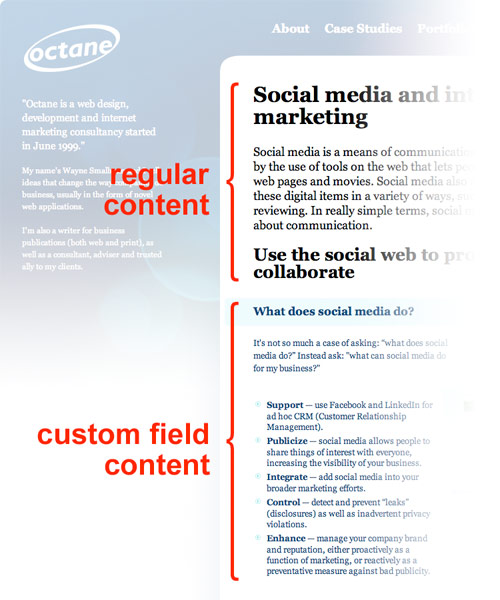
WordPress is more than just blogging software. It’s now a genuine, simple and cost effective way for teams of people to manage content. WordPress isn’t perfect — you only get the one content area, which isn’t ideal. Here I’ll explain a work around that’s both simple and effective.

In lieu of the WordPress ebook I’m working on (which is close to going live, by the way), here’s an advanced topic for the power WordPress users amongst you. If you’re not a power user, but understand the benefits of what this article discusses, let me know and I can certainly help out.

Here I am, re-working the Octane website from scratch. I have all these design ideas, but they all break when I take into account how WordPress 2.9 doesn’t allow for multiple content areas, which is a real shame.

A few months previously, I’d been playing around with custom fields for a client website — I’d used them to store information for the main navigation on the website, such as a shorter name for each Page to use in the navigation, and a value to tell the Plugin which Pages to include and exclude. So this got me thinking.

Can I use custom fields as content areas?

And the answer is a big fat yes! That said, anyone who’s used custom fields will know that you don’t get a fancy editor for your content; all you have is this plain text box. That itself could be the cue for a Plugin, but right then and there, it wasn’t an issue.

So that we know where all of this is going, I’ll explain what I was doing. I wanted to add blocks of text (containing headers, regular paragraph text and lists) to my Pages and then be able to add graphical devices in between.

Add the content into the custom fields

First things first, you need to add your content.

  1. Either edit or add a new Page or Post.
  2. Scroll down to the “Custom Fields” box.
  3. Under the “Name” label, either choose from a previous custom field from the drop-down / pop-up, or click the “Enter new” link button beneath it and type the name.
  4. Under the “Value” label, either type in or paste you content.
  5. Now click the “Add Custom Field” button.
  6. If this is a new Page or Post, be sure to either save draft or publish. If it’s a previous Page or Post, you don’t even need to update.

Add the custom field data to your theme

Now that you have your content added into custom fields, the next thing is to get that content into your theme. I don’t know where you’re placing any of this, so all I can do is explain how you pull your custom field content in.

  1. Select the place in your Page or Post theme file where you want your custom field data to appear.
  2. Paste the code below into that area.
  3. Swap out where it says: “features” with the name of your custom field.

[codesyntax lang=”php” lines_start=”1″]

<?php $block = get_post_meta($post->ID, ‘name_of_custom_field’); if (!empty($block)) { foreach(($block) as $blocks) { echo $blocks; } } ?>

[/codesyntax]

Keep in mind, you can call custom field meta data from outside of The Loop — which is to say, you don’t need to be inside the loop that WordPress uses to summon up data about a particular Post or Page.

Making your custom fields conditional

This code runs a check to make sure there’s data in the custom field. So, for example, you could invoke a layer in your Page or Post only if there’s content present:

[codesyntax lang=”php” lines_start=”1″]

<?php $block = get_post_meta($post->ID, ‘name_of_custom_field’);

if (!empty($block)) { ?>
<div class=”name_of_division_class”>
<?php

foreach(($block) as $blocks) { echo $blocks; }

?></div><?php

} ?>

[/codesyntax]

But are custom fields searchable?

By default, no they’re not. So if you’re using them to store lots of content — such as product data, for example — people searching your WordPress-driven website won’t find any of the carefully curated content you’ve added into your custom fields. Dilemma.

However, there’s a fix for this, all thanks to John Hoff, who’s written a script that extends the scope of the WordPress search engine to grab custom field data, too — which you can download here.

I’ve taken his code (which was a Plugin in all but name) and turned it into an actual Plugin you can install into your copy of WordPress. Once installed, you’ll need to edit line 37, which includes the names of the custom fields you want searched:

[codesyntax lang=”php” lines_start=”1″]

$customs = Array(‘additional’, ‘benefits’, ‘features’);

[/codesyntax]

So, within the Array() item, just change names of the items within the single quotes.

Editing the name values of the custom fields array

To add a new custom field:

  1. add a comma after the last single quote;
  2. followed by a single quote;
  3. then the name of the custom field;
  4. followed by a closing single quote.

To remove a custom field:

  1. select comma before its name;
  2. and the last single quote after its name.

You’ve now learned how to turn WordPress into a more featured content management system, hopefully without breaking too much of a sweat. As always, if you get stuck, leave a comment and I’ll see if I can help out.